


Health insurance plays an important role in Saudi Arabia’s healthcare system, making insurance claims a significant source of revenue for hospitals and clinics. When an insured patient visits a healthcare facility, NPHIES helps verify their insurance coverage and facilitates the submission of claims for the treatment provided.
However, understanding how NPHIES works and integrating it into hospital operations has a series of steps. This blog explains the NPHIES platform, its key functions and how it supports insurance processes in Saudi Arabia. Let us explore how NPHIES works and what your healthcare team needs to know for successful implementation.
What is the NPHIES Portal?
NPHIES stands for National Platform for Health and Insurance Exchange Services. It is the central gateway for health insurance transactions between providers and insurers in the Kingdom. The official guide describes it as a centralized, validating, standards-based exchange, created by bringing together earlier financial and clinical data programs led by the Council of Health Insurance and the Ministry of Health. People often search for it as NPHIES KSA or NPHIES Saudi, but the idea is the same.
The scale is impressive. You will find more than 6,419 provider facilities and over 60 software vendors onboarded. It says all private insurers or their administrators, and most regulated providers, exchange claims through the platform, and any of about 18,000 Saudi healthcare organizations can connect.
Where NPHIES Fits in the Insurance Journey
NPHIES should not be viewed as a portal that the billing team uses only when it is time to submit a claim. It sits across much more of the insured patient journey.
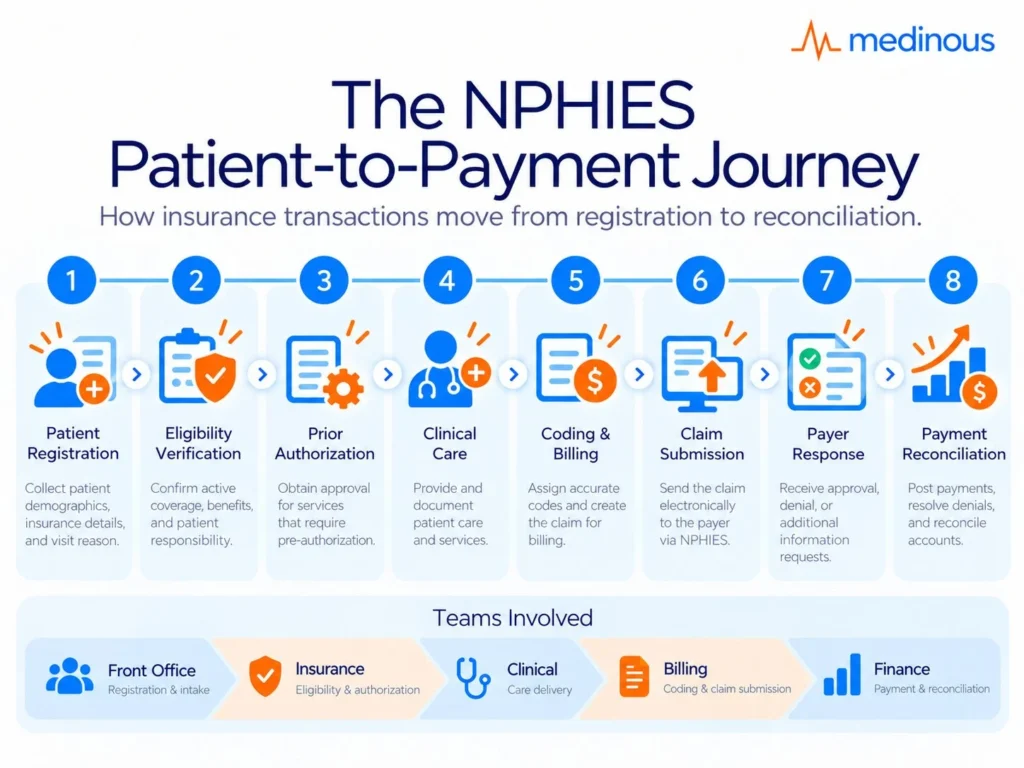
A typical journey may involve:
- Patient registration
- Insurance identification
- Eligibility verification
- Prior authorization
- Clinical documentation
- Coding and billing
- Claim submission
- Insurer queries or responses
- Payment reconciliation
Information created at the beginning of the visit can influence what happens much later in the claim cycle. An incorrect member ID, payer identifier or authorization reference can eventually result in rejection or additional manual work.
That is why NPHIES readiness involves front-office, clinical, coding and billing teams — not only the insurance department.
Registration → Eligibility → Authorization → Clinical Care → Coding → Claim → Payer Response → Reconciliation
How Does the NPHIES Portal Work?
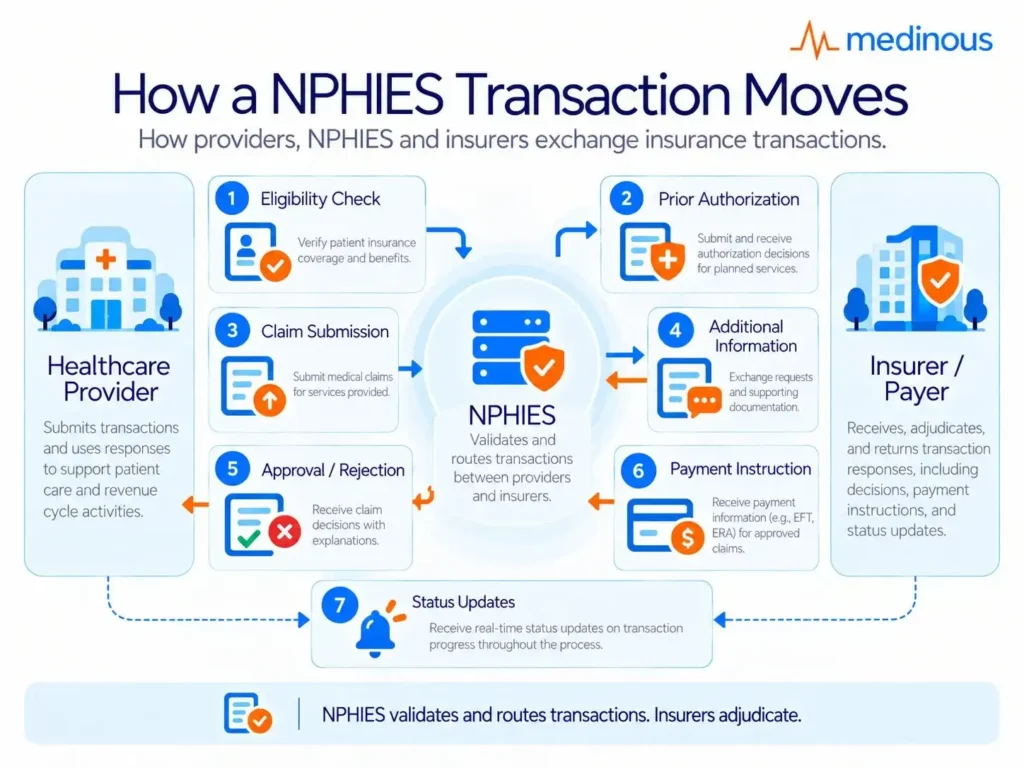
Think of NPHIES as a smart courier. Your system sends a message, NPHIES checks its format and content, then delivers it to the insurer in real time, stores it until the insurer is ready, or rejects it if it is invalid. There are no direct exchanges between providers and payers any more. NPHIES does not decide payment. Insurers still adjudicate.
It helps to know what NPHIES does not do:
- It does not process or approve claims.
- It does not regulate the market, though it alerts regulators such as CHI to compliance issues.
- It does not decide fraud. It only flags questionable transactions for the insurer to review.
- It is not a full practice management system.
- It does not back up your data, so providers must manage their own infrastructure.
The platform does keep copies of exchanges to support dispute resolution and market oversight.
NPHIES Validation Is Not the Same as Claim Approval
This distinction is important for operational teams.
A transaction successfully passing through NPHIES means that the message has met the platform’s required validation and exchange rules. It does not mean the insurer has agreed to pay the claim.
There are therefore two different questions:
Did NPHIES accept and route the transaction?
Did the payer approve or adjudicate it?
Hospitals should make sure their systems and dashboards distinguish between platform-level errors, payer responses and final payment outcomes. Otherwise, teams may waste time investigating the wrong part of the process.
What Is the NPHIES Provider Portal?
The NPHIES provider portal is the entry point for provider organizations. The official guide notes that NPHIES offers a simple claims entry system for providers until they adopt a full information system. It also mentions an insurance data lookup interface, called HIDP, that lists insurers holding policies for a patient. Larger organizations normally connect their own software instead of typing into a portal all day.
Your team can also find documentation, including guidelines for the insurance data lookup, on the NPHIES unified portal. Keep these documents handy because your vendor and billing team will refer to them often.
Portal Entry vs Integrated NPHIES Workflow
For smaller providers or organisations at an early stage of digital adoption, manual portal entry can provide a way to participate in the NPHIES ecosystem.
As transaction volumes increase, however, repeatedly entering information into a separate portal can create operational friction.
An integrated workflow can reduce the need to move between systems because information already captured during registration, consultation and billing can support the NPHIES transaction.
The difference can be thought of simply:
Portal-based workflow: staff capture information in the healthcare system and may then perform additional work in another interface.
Integrated workflow: the hospital or clinic system prepares and exchanges the required transaction as part of the normal operational process.
For higher-volume hospitals and clinic groups, this distinction can have a significant impact on workload and data consistency.
How Hospitals and Clinics Use NPHIES
Experts describes a daily flow:
- Check eligibility at booking or registration.
- Request prior authorization for services that need approval.
- Submit the claim after the visit.
- Answer insurer requests for more information.
- Reconcile payments against claims.
In practice, a clinic system never talks to an insurer directly. Every message goes through NPHIES, so a clean setup on your side saves time later.
The NPHIES Transaction Flow in Practice
A well-designed workflow connects the stages rather than treating each transaction as a separate administrative task.
1. Verify eligibility
Confirm the patient’s coverage, policy and relevant insurance information before care is delivered.
2. Manage authorization
Identify services requiring approval and send the required clinical and administrative information.
3. Deliver and document care
Ensure diagnoses, procedures, medicines and supporting information are recorded accurately.
4. Prepare the claim
Use completed clinical and billing information to build the insurance transaction.
5. Submit through NPHIES
The platform validates and routes the transaction to the appropriate payer.
6. Respond to exceptions
Requests for additional information, corrections or payer responses should be visible to the appropriate team.
7. Reconcile payment
Match payer responses and payments against the original claim and hospital billing records.
The goal should be to make this flow as continuous as possible so staff do not have to reconstruct the patient encounter at the claims stage.
How a NPHIES Transaction Moves
Healthcare Provider → NPHIES Validation → Insurer → Response → Provider
Key Functions of the NPHIES Portal
NPHIES portal has the following key functions:
- Eligibility: confirms coverage
- Prior authorization: approves services in advance
- Claims: asks for payment
- Communication: exchanges supporting documents
- Payment reconciliation: shows what was paid
- Polling: collects queued responses
Research reports 292 million transactions in 2024, which shows how central it has become.
Experts also list use cases such as batch claims, advanced authorization, cancellation, status checks and error notices. Volume keeps growing. In the first quarter of 2025, it reports 96 million transactions, including 50 million eligibility checks, 11 million authorizations, 31 million claims and 4 million payment messages.
Why Eligibility and Authorization Deserve Special Attention
Some claim problems begin before the patient reaches the consultation room.
If eligibility is checked against the wrong member details, the incorrect payer or policy class may be used throughout the remaining workflow. Similarly, if a service requiring authorization is delivered before approval is received, the billing team may have limited options later.
Hospitals and clinics should therefore treat eligibility and authorization as revenue-cycle controls, not merely administrative formalities.
Useful operational measures include:
- Eligibility failure rate
- Pending authorization volume
- Average authorization turnaround time
- Authorizations approaching expiry
- Claims submitted without required authorization
- Top recurring authorization rejection reasons
Visibility at this stage helps teams correct problems before they become claims.
NPHIES Integration With Healthcare Systems
Healthcare providers can connect to NPHIES either directly or through an intermediary. When using an intermediary, the clinic’s system communicates with its interface using the healthcare provider’s own credentials. When a vendor says it is integrated, ask which route it uses.
A strong NPHIES integration should sit inside your hospital management system so registration, billing and clinical data stay in one place. Good healthcare interoperability, built on HL7 FHIR R4, keeps those exchanges consistent. See also healthcare interoperability in larger hospital setups.
A simple integration plan looks like this:
- Choose a direct or intermediary connection.
- Collect provider IDs and credentials.
- Test in staging.
- Train staff on daily checks.
- Go live and watch rejections closely.
What Hospitals Should Ask an NPHIES Integration Vendor
The word “integrated” can mean different things, so hospitals should look beyond whether a vendor can technically connect to NPHIES.
Ask questions such as:
- Is the connection direct or through an intermediary?
- Which NPHIES transactions are supported?
- Can eligibility be checked from registration?
- Can authorization requests be tracked inside the system?
- Can clinical and billing information populate claims without re-entry?
- How are rejected transactions displayed?
- Can users distinguish NPHIES errors from payer rejections?
- Are correction and resubmission workflows supported?
- Can payment responses be reconciled against claims?
- How are staging and production credentials managed?
- How are NPHIES specification changes incorporated into the product?
The strongest integration is the one staff can use as part of their existing workflow rather than as another system they have to manage separately.
Explore the NPHIES Solution
See how Medinous supports NPHIES-ready workflows across insurance, billing, patient data and code mapping for hospitals and clinics in Saudi Arabia.Explore Medinous NPHIES Integration
See NPHIES in an Integrated HMS
A closer look at how NPHIES can connect with hospital clinical, insurance and operational workflows.Exploring Healthcare Efficiency: NPHIES Integrated Hospital Management System
Preparing for NPHIES? Check Your Readiness Before Go-Live
A practical 10-point assessment for hospitals, polyclinics, medical centres and day surgery centres preparing for NPHIES.Download the NPHIES Readiness Checklist
Benefits of NPHIES for Healthcare Providers
Here are few of the benefits of NPHIES for healthcare providers:
- More consistent and higher quality data.
- Clearer data rules for eClaims.
- Higher satisfaction for providers, payers and patients.
- Lower market costs.
- More first-time-right exchanges.
Experts say that 96% of authorizations are adjudicated within 30 minutes, which can shorten the wait for approvals.
The Operational Benefit Is Fewer Avoidable Handoffs
For providers, the value of NPHIES is not limited to digitising an insurance message.
When the workflow is properly integrated, the same information can move through registration, authorization, clinical care, billing and claims without being repeatedly recreated.
This can help reduce:
- Duplicate data entry
- Manual portal work
- Missing insurance details
- Untracked approvals
- Claim preparation effort
- Reconciliation work
- Delays caused by incomplete information
The quality of the result, however, still depends on the quality of the data captured by the healthcare provider. Automation cannot compensate for incorrect patient, payer, coding or billing information at source.
NPHIES Requirements for Hospitals and Clinics
You should be ready with the following NPHIES requirements for hospitals and clinics:
- Your NPHIES provider ID, plus intermediary credentials if used.
- Separate test and live credentials.
- Payer identifiers, including those for third-party administrators.
- Policies and classes with deductibles, copays and limits.
- Price lists agreed with each payer.
- Complete clinician and department data.
Do not forget people. Assign one owner for approvals and another for claims, so nothing sits unattended.
NPHIES Readiness Is Part Data, Part Process and Part Ownership
Hospitals often focus first on credentials and technical integration, but successful implementation requires three areas to be aligned.
Data readiness
Provider details, payer identifiers, policies, price lists, clinician information and coding data need to be accurate.
Process readiness
Teams should know when eligibility is checked, when authorization is required, how insurer queries are handled and how corrected claims are submitted.
Ownership
Every exception needs somewhere to go. Eligibility failures, pending approvals, rejected claims and payment differences should have clear owners.
Without ownership, even a technically correct NPHIES implementation can develop long queues of unresolved transactions.
Common Challenges With NPHIES
Researchers have pointed out these few common challenges with NPHIES:
- Eligibility checked against the wrong member ID.
- Services delivered before approval is returned.
- Diagnosis and procedure codes that do not support each other.
- Medicines placed on the wrong claim type.
- Missing documents when insurers ask.
- Resubmissions sent as new claims instead of corrections.
A clean claim depends on the following factors:
- The correct policy and class, and not just the insurer name.
- Payer identifiers for each insurer and administrator.
- The prior authorization reference where approval was needed.
- Coded diagnoses with the principal diagnosis marked.
- Price list codes agreed with the payer.
- The same episode identifier for services in one episode of care.
Where NPHIES Rejections Commonly Begin
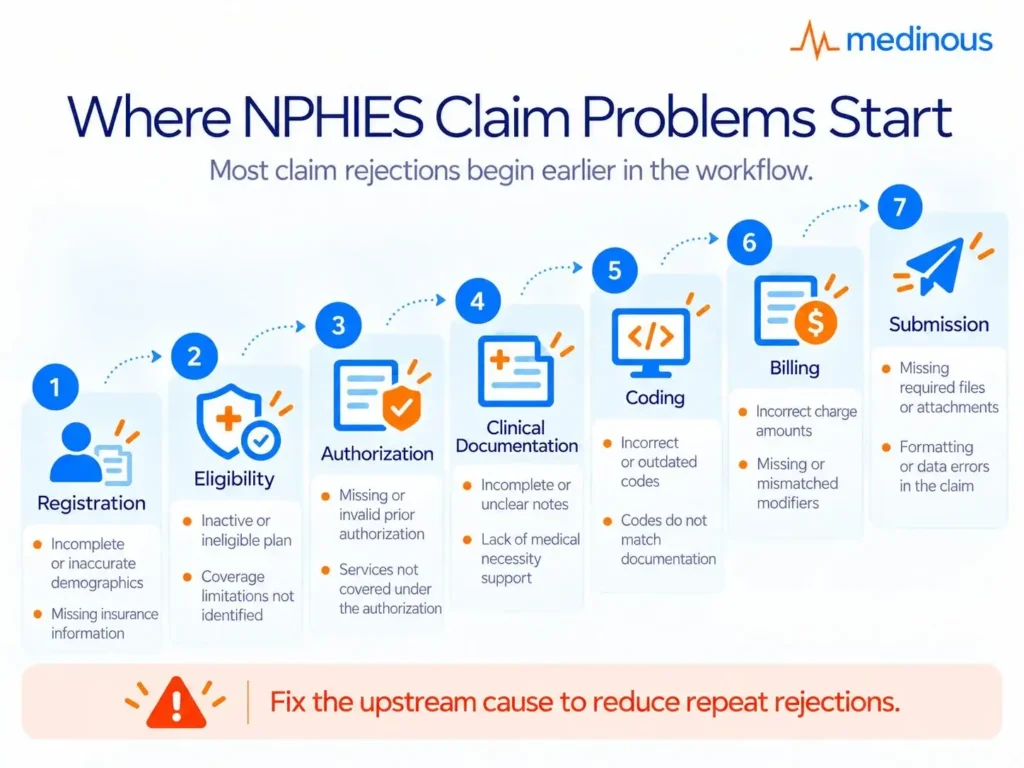
A rejected claim often appears to be a billing problem, but the underlying error may have occurred much earlier.
Registration → incorrect patient or insurance information
Eligibility → wrong member, payer or policy details
Authorization → missing or expired approval
Clinical documentation → insufficient support for the billed service
Coding → inconsistent or incomplete diagnosis and procedure information
Billing → incorrect price-list mapping or claim type
Submission → missing references or incorrect resubmission process
Hospitals should therefore analyse rejection reasons by source, not only count the number of rejected claims.
A recurring rejection is a process problem. Fixing the upstream cause is usually more valuable than repeatedly correcting individual claims.
Where NPHIES Claim Problems Start
Registration / Eligibility / Authorization / Documentation / Coding / Billing / Submission
Best Practices for NPHIES Implementation
Few of the best practices for NPHIES implementation needs to be followed:
- Test in staging before going live.
- Run eligibility before every insured visit.
- Keep a live list of open approvals with expiry dates.
- Close visits with coded diagnoses the same day.
- Answer insurer requests quickly.
- Reconcile payments often.
- Use a medical billing platform built for insurance work.
NPHIES handles insurance, while ZATCA handles tax invoices. Insured services appear on both, so amounts should agree. Building both from the same invoice, avoids reconciliation problems at month-end. A hospital system that holds registration, clinical and billing data together also reduces gaps.
Confirm with your software vendor how the system connects to NPHIES and who manages the login credentials. Regularly update the insurance company records, including the identification details of each insurer and third party administrator.
Monitor NPHIES Performance After Go-Live
Implementation does not end when the connection moves from staging to production. Hospitals need ongoing visibility into how the workflow is performing.
Useful measures include:
- Eligibility success rate
- Open and ageing authorizations
- Authorization turnaround time
- First-time claim acceptance rate
- Claim rejection rate
- Top rejection reasons
- Claims awaiting additional information
- Resubmission volume
- Payment reconciliation exceptions
- Outstanding payer responses
These metrics help hospital leaders distinguish isolated errors from recurring process issues.
NPHIES should therefore become part of the organisation’s regular revenue-cycle review, rather than something the IT team checks only when an interface fails.
NPHIES and ZATCA Need to Meet at the Billing Workflow
NPHIES and ZATCA serve different purposes, but insured services can flow through both processes.
NPHIES manages insurance transactions. ZATCA governs electronic invoicing.
If the insurance claim is built from one set of values and the tax invoice from another, finance teams may end up resolving avoidable differences later.
A connected workflow should allow hospitals to trace:
Clinical service → charge → NPHIES claim → payer response → invoice → payment
This improves reconciliation and makes it easier to investigate exceptions when figures do not align.
See How the Financial Workflows Connect
Useful for teams managing both insurance transactions and Saudi e-invoicing within the same financial workflow.ZATCA + NPHIES Integration: How Medinous HMS Keeps KSA Hospitals Doubly Compliant
How Medinous Supports NPHIES-Connected Workflows
NPHIES works best when insurance transactions are connected to the hospital’s broader patient and financial workflow.
Medinous supports NPHIES within its healthcare management environment, allowing hospitals and clinics to connect insurance activities with areas such as registration, clinical documentation, coding, billing and reconciliation.
This integrated approach can help healthcare providers reduce repeated entry and give teams better visibility into the complete insurance journey.
For hospitals and clinic groups, the objective is not merely to “connect to NPHIES.” It is to make NPHIES part of the normal operational workflow so insurance transactions move with the patient encounter rather than alongside it in a separate process.
Frequently Asked Questions :
What does NPHIES stand for?
NPHIES full-form is a National Platform for Health and Insurance Exchange Services.
Do I need a direct connection?
No. Providers can use an intermediary such as Waseel.
Which standard does NPHIES use?
HL7 FHIR R4 is the standard NPHIES use.
Does NPHIES approve claims?
No, NPHIES does not approve insurance claims. It validates and exchanges claim information between healthcare providers and insurers, while the insurance companies make the final decision on claim approval.
What is HIDP?
HIDP is an interface that lists insurers holding policies for a patient when the provider does not know them.
Is NPHIES the same as ZATCA e-invoicing?
No. NPHIES covers insurance transactions, while ZATCA covers tax invoices. While, insured services need both.
Can small clinics use NPHIES?
Yes. The Saudi healthcare provider can connect, and a simple claims entry system exists until a full system is adopted.
What is polling?
It lets providers collect responses that were not returned immediately.
What is the difference between the NPHIES portal and NPHIES integration?
The portal provides an interface through which providers can perform NPHIES-related activities, while integration allows a hospital or clinic management system to exchange NPHIES transactions as part of its existing workflow. Integration can reduce repeated data entry for organisations processing larger transaction volumes.
Why do NPHIES claims get rejected?
Rejections can result from incorrect patient or payer information, missing authorization, coding inconsistencies, missing documents, incorrect price-list mapping or errors in how a correction or resubmission is handled. Hospitals should analyse recurring rejection reasons to identify the upstream process causing them.
How can hospitals reduce NPHIES claim rejections?
Check eligibility early, manage authorizations before services are delivered, complete clinical documentation and coding promptly, validate payer and price-list information, submit clean claims and track recurring rejection reasons.
Should eligibility be checked for every insured visit?
Eligibility checks help confirm that the patient’s coverage and policy information are valid for the encounter. Running the check before services are delivered can reduce downstream insurance issues.
What should hospitals monitor after NPHIES go-live?
Useful measures include eligibility failures, pending authorizations, claim acceptance and rejection rates, top rejection reasons, resubmission volume and payment reconciliation exceptions.
Can NPHIES and ZATCA be managed in the same hospital system?
They perform different regulatory functions, but an integrated hospital management system can connect the underlying billing information used across both workflows. This can reduce duplicate entry and make claim-to-invoice reconciliation easier.