

Patient records contain some of the most sensitive information handled by hospitals. Even a single data breach can compromise patient privacy, expose confidential medical details, and damage the hospital’s reputation. No healthcare organisation would want to put its patients or their trust at risk.
This is where a strong data security system becomes essential. It helps hospitals protect sensitive information, prevent unauthorized access, and maintain the confidentiality of patient records. A secure system also ensures that healthcare professionals can access the information they need without compromising patient privacy.
This blog explores the importance of building a secure system for storing and managing hospital data. You will learn about the essential security features to look for in a hospital management system and how they help safeguard sensitive information. Let us explore these features and understand their role in maintaining hospital data security.
What Is an EMR System?
An EMR system stores a patient’s medical history, diagnoses, medicines, test results and billing details in digital form. Medical EMR systems replace paper files, so doctors, nurses and labs see the same information.
Strong security keeps that shared access safe for patients and staff alike. Good healthcare EMR tools also help with orders, alerts and reports. In Medinous, the EMR module sits inside the Doctors Workbench, where clinicians work with patient data every day.
A typical record includes:
- Medical history and diagnoses
- Medicines and allergies
- Lab and radiology results
- Billing details
As so many departments touch the record, the real question is not only what the system stores but who can reach it.
Why EMR Security Is More Than an IT Issue
EMR security is often treated as the responsibility of the IT or cybersecurity team. In practice, it is an operational responsibility shared across the hospital.
A single patient record may be accessed by:
- Doctors
- Nurses
- Laboratory teams
- Radiology teams
- Pharmacy
- Billing and insurance staff
- Medical records teams
- Hospital administrators
Each user needs different information for a different purpose. A secure EMR should therefore do more than keep outsiders away. It should also control how authorised users access, change and share information inside the organisation.
Security becomes strongest when it is built into normal clinical and administrative workflows rather than added as a separate layer after implementation.
Why Healthcare Data Security Matters
Healthcare electronic medical records attract cyber criminals because of the sensitive data inside. The connected devices, cloud storage, phishing and human error all create risk. Protecting patient data is about earning patient trust, and not just ticking compliance boxes.
In Saudi Arabia, health data is sensitive data under the PDPL, which carries fines up to SAR 5,000,000. Healthcare data security is a legal matter too.
The main risks: AI-powered phishing, cloud storage with weak encryption or sign-in checks, connected medical devices, and human error or insider misuse.
What Makes Healthcare Data Especially Sensitive
Unlike many other business records, healthcare data often combines several categories of sensitive information in one place.
An EMR may contain:
- Identity and demographic information
- Medical history
- Diagnoses
- Medications
- Laboratory and imaging results
- Insurance information
- Financial details
- Clinical notes
- Appointments and treatment history
That means a security incident may affect privacy, clinical operations, billing and patient trust at the same time.
Hospitals should therefore think about EMR security across three objectives: confidentiality, integrity and availability.
- Confidentiality: Only the right people should be able to see the data.
- Integrity: Information should not be changed inappropriately or without traceability.
- Availability: Clinicians should be able to access the record when it is needed for patient care.
A secure EMR has to protect all three.
Essential Data Protection Features in EMR Systems
Look for these building blocks:
- Strong passwords and multifactor authentication
- Role-based access
- Encryption in transit and at rest
- Audit trails
- Automatic updates and patches
- Backups and recovery plans
- Regular staff training
Think of security as layers. If one layer fails, the next one still protects the record. When you meet a vendor, ask these questions:
- Is data encrypted in transit and at rest?
- Is multifactor authentication supported?
- Can I see audit logs?
- How are updates handled?
- Where is data hosted?
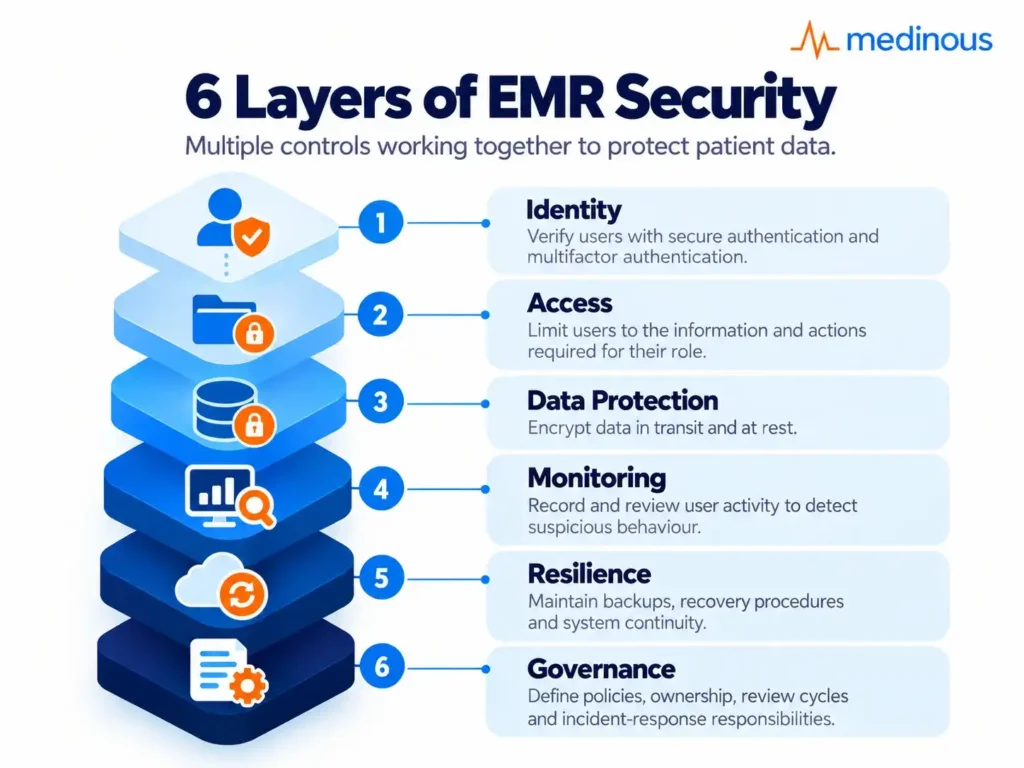
A Layered Security Model for EMR Systems
No single security feature can protect an EMR on its own. Hospitals need multiple controls working together.
A practical model can include six layers:
1. Identity
Verify who the user is through secure authentication and multifactor authentication.
2. Access
Limit users to the information and actions required for their role.
3. Data Protection
Encrypt information while it is stored and while it moves between systems.
4. Monitoring
Record and review user activity so suspicious behaviour can be detected.
5. Resilience
Maintain reliable backups, recovery procedures and system continuity plans.
6. Governance
Define policies, ownership, review cycles and incident-response responsibilities.
The value of this layered approach is simple: if one control fails, another control can still reduce the impact.
Role-Based Access Control for Medical Records
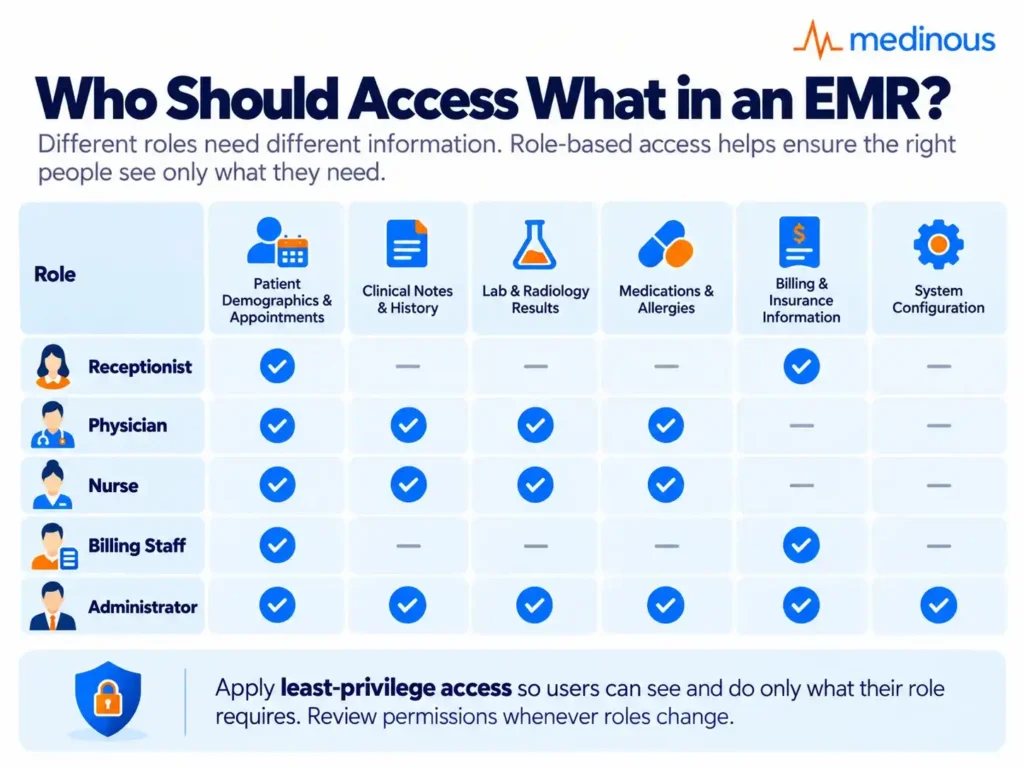
Not everyone needs to see everything. Meddbase explains that role-based access limits what each user can view or change based on job role. A billing clerk does not need clinical notes, and a nurse does not need payroll data. Experts link this to zero trust thinking, where users receive only the minimum access they need. A clinical management system should let administrators set these permissions easily.
Zero trust can be described with four parts: role-based access, micro-segmentation that splits data into secure zones, continuous monitoring and time-limited access to high-risk data. Review roles whenever staff move departments.
Least Privilege: Give Users Only the Access They Need
Role-based access works best when combined with the principle of least privilege.
This means users receive only the minimum level of access needed to perform their responsibilities.
For example:
- A receptionist may need demographic and appointment information but not detailed clinical notes.
- A physician may need access to the complete clinical record but not finance administration settings.
- A billing user may require insurance and charge information without access to unrelated clinical details.
- An administrator may need configuration access without unrestricted access to every patient’s record.
Hospitals should also review what each role can do, not only what it can see. Viewing, editing, exporting, deleting and approving information are different permissions.
This reduces unnecessary exposure while making accountability clearer.
Data Encryption and Secure Data Storage
Encryption scrambles data so stolen files stay unreadable. Experts recommend encrypting data both in transit, when it moves between servers and devices, and at rest, when it is stored. Check that your vendor stores backups securely and tells you where data is hosted. Hosting location matters under local laws, so ask early.
The encrypted stored data stays unreadable even if a breach occurs. It is also recommended to set complex passwords with capital letters, numbers and symbols, no reuse across accounts and regular changes, with multifactor authentication on top.
Ask where backups live and who holds the keys. Researchers advise end-to-end encryption and multifactor authentication for cloud EMRs, and strict access controls with firewalls for connected devices.
Questions Hospitals Should Ask About Data Hosting
Where patient information is stored matters just as much as how it is encrypted.
When evaluating an EMR provider, hospitals should understand:
- Where production data is hosted
- Where backups are stored
- Whether data is replicated across locations
- Who can access hosting environments
- How encryption keys are managed
- How data is separated between customers
- How long data is retained
- What happens to the data when the contract ends
Hospitals operating across different countries should also consider whether local data-protection requirements affect where information may be stored or transferred.
The provider should be able to explain this clearly without requiring the hospital to interpret technical architecture documents on its own.
Audit Trails and Activity Monitoring
An audit trail records who opened or changed a record, and when. It deters misuse and helps trace what happened after a breach. Continuous monitoring can flag unusual access patterns. Ask who reviews these logs, and how often.
Useful alerts include many records opened in a short time, access at odd hours, and access by staff who are not involved in the patient’s care.
What a Useful EMR Audit Trail Should Show
An audit log becomes valuable when it can answer clear operational questions.
Hospitals should be able to determine:
- Who accessed the record?
- Which patient record was accessed?
- When did the activity happen?
- What information was viewed?
- What information was changed?
- What was the previous value?
- Was information exported or printed?
- Was a user’s permission changed?
- Was the activity successful or blocked?
Auditability is important for investigations, but it is also useful for prevention. Reviewing unusual behaviour early may allow hospitals to act before an incident becomes more serious.
Evaluating Your EMR? Look Beyond Security Features
Security is one part of the decision. Use Medinous’ 10-step guide to review requirements, vendor fit, implementation, support, security and long-term scalability.Download the 10-Step Guide to Choosing the Right Hospital Management System
Patient Data Privacy and Access Management
Privacy is about respect as well as rules. Hospitals should:
- Collect only the data they need
- Explain how data is used
- Remove access when staff change roles or leave
- Keep consent records
- Offer patients secure portal access to their own information
Some systems also add fingerprint or facial recognition on top of passwords.
The User Lifecycle Is a Security Control
Access management should cover the entire lifecycle of an employee or system user.
That means security starts when an account is created and continues until the account is closed.
A good process includes:
Joiner: Give the new employee the correct role and minimum required permissions.
Mover: Review access when the employee changes department or responsibility.
Leaver: Remove access promptly when the employee leaves the organisation.
Hospitals should also review dormant accounts, temporary users and third-party access. An account that is no longer needed can become a security risk if it remains active.
Secure Data Exchange and System Integration
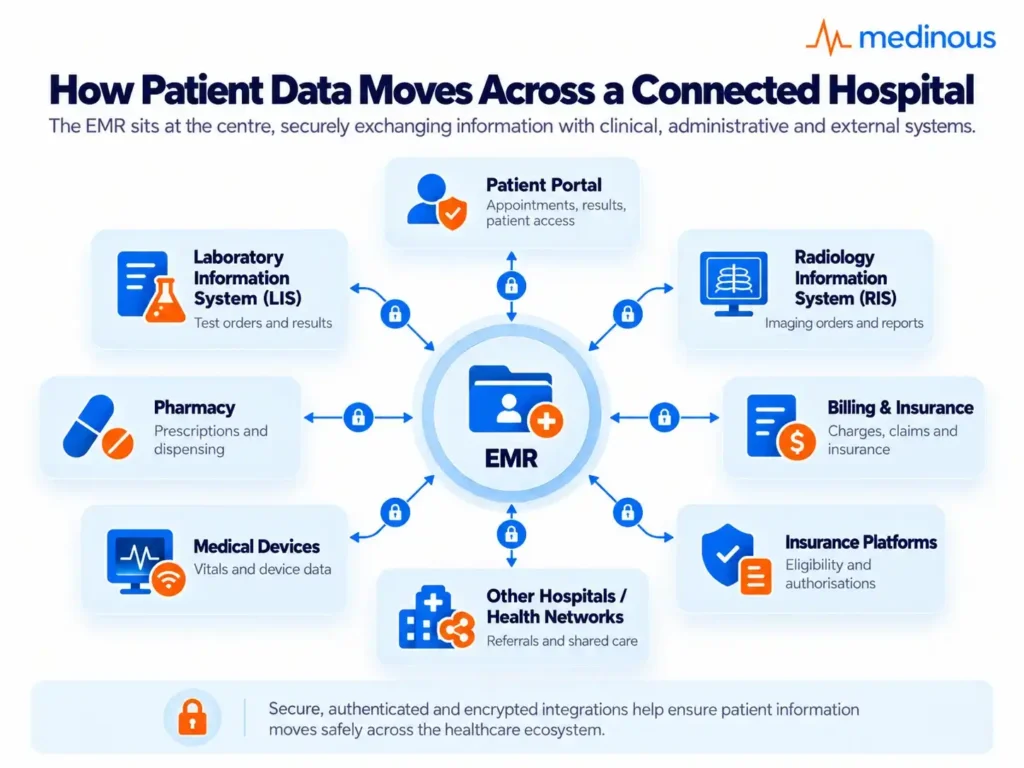
Records rarely stay in one place. They move to labs, imaging and billing. A laboratory information system and a radiology information system should send results into the patient record through secure, authenticated links.
Avoid email attachments and shared spreadsheets. Check that every connected tool follows the same access and logging rules. Medical devices can become entry points, so protect them with firewalls and strict controls.
Medinous also provides an Application Setup module, which hospitals can use to configure how the system is arranged for their teams.
Every Integration Expands the Security Boundary
Hospitals increasingly operate through connected systems. The EMR may exchange information with laboratory systems, radiology, pharmacy, insurance platforms, patient portals, medical devices and financial applications.
Every connection creates value, but it also creates another point that needs to be secured.
Before connecting a system, hospitals should ask:
- What information will be exchanged?
- Is the connection authenticated?
- Is the information encrypted?
- Which system is the source of truth?
- Who can initiate the exchange?
- Is activity logged?
- What happens if the connected system is unavailable?
- Can access be revoked quickly if needed?
Interoperability should therefore be designed together with security, not implemented first and protected later.
Backup and Disaster Recovery for EMR Systems
Ransomware, power failure or human error can wipe data. Experts point to automated backups as protection against data loss and ransomware. Good practice includes:
- Regular automatic backups
- Copies stored in separate locations
- Restore tests, not only backup tests
- A written recovery plan with named owners
The cloud vendors can apply updates and patches automatically, which avoids downtime and closes known gaps.
Backup Is Not the Same as Recovery
Having a backup does not automatically mean a hospital can recover quickly after an incident.
A recovery plan should answer two practical questions:
How much data can the hospital afford to lose?
How long can the hospital operate without the EMR?
Hospitals should test restoration regularly so teams know that backups can actually be used. Tests should also confirm that the restored information is complete, secure and usable.
The recovery plan should define who makes decisions, how users are informed and how clinical operations continue while systems are being restored.
Common Healthcare Data Security Challenges
Here are a few of the common healthcare data security challenges:
- Weak or reused passwords, which Meddbase calls a common cause of breaches.
- Staff clicking phishing emails.
- Outdated software that misses patches.
- Too many users with broad access.
- Cloud settings that are poorly configured.
- Insider misuse, whether careless or deliberate.
- Limited budgets and small IT teams.
Where EMR Security Problems Commonly Begin
Security problems often start with ordinary operational gaps rather than sophisticated attacks.
Examples include:
- Shared user accounts
- Permissions that were never removed after a role change
- Old employee accounts that remain active
- Users exporting patient information unnecessarily
- Unsecured spreadsheets containing clinical data
- Weak passwords
- Unpatched devices
- Third-party integrations with excessive access
- Backups that have never been restored in a test
- Audit logs that exist but are never reviewed
This is why security maturity depends as much on process discipline as it does on technology.
Best Practices for Securing Electronic Medical Records
A few of the best practices for securing electronic medical records:
- Turn on multifactor authentication for everyone.
- Review user permissions every quarter.
- Train staff on phishing with fresh examples.
- Apply updates promptly.
- Test your restore process.
- Review audit logs on a schedule.
- Watch regulation changes. Research reports a proposed update to the HIPAA Security Rule that would make encryption and risk assessments stronger duties.
- Choose vendors that explain their security plainly.
Experts also list asset inventories, network maps showing where patient data travels and a ready incident response plan among the proposed HIPAA duties. Run a mock breach drill twice a year so everyone knows their role.
Human error is often the weak link. Regular security training, including phishing awareness and updated threats, makes your team the first line of defence.
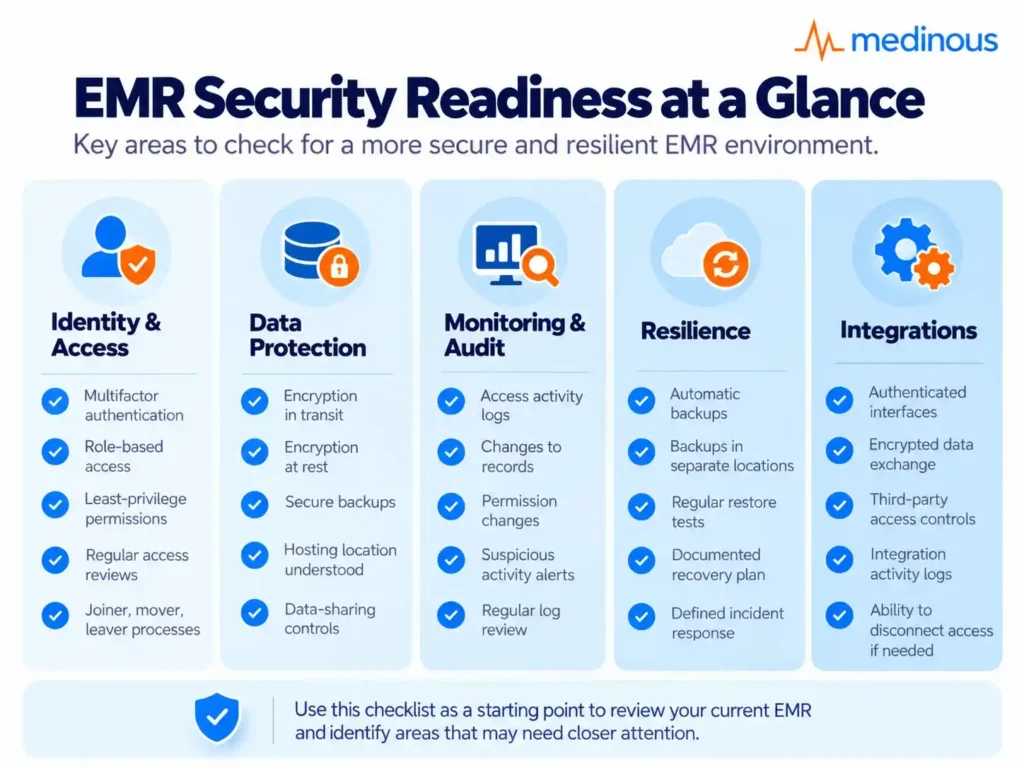
A Practical EMR Security Readiness Checklist
Hospitals can use this checklist when reviewing an existing EMR or evaluating a new one.
Identity and Access
- Multifactor authentication is available
- Role-based access is configurable
- Permissions follow least-privilege principles
- Inactive accounts can be identified
- Joiner, mover and leaver processes are defined
Data Protection
- Data is encrypted in transit
- Data is encrypted at rest
- Backup data is protected
- Hosting locations are understood
- Data-sharing controls are defined
Monitoring
- Access activity is logged
- Changes to records are traceable
- Permission changes are auditable
- Suspicious activity can be reviewed
- Named teams are responsible for monitoring
Resilience
- Backups run automatically
- Backups are stored separately
- Restoration is tested
- Recovery procedures are documented
- Incident-response responsibilities are assigned
Integrations
- Interfaces are authenticated
- Data exchanges are encrypted
- Third-party access is controlled
- Integration activity is logged
- Connected systems can be disconnected if required
Security should be treated as a continuous operating discipline rather than a one-time implementation task.
What Hospitals Should Ask an EMR Vendor About Security
A security discussion with an EMR provider should go beyond asking whether the system is “secure.”
Hospitals should ask specific questions such as:
- How is access controlled by role?
- Does the system support multifactor authentication?
- How is data encrypted?
- Where is data hosted?
- How are backups protected and tested?
- Can administrators review audit trails?
- How are user access changes recorded?
- How are integrations authenticated?
- How are software updates and security patches managed?
- How does the vendor respond to security incidents?
- What controls exist for patient portals and remote access?
- How does the platform support local data-protection requirements?
A vendor should be able to explain these controls in clear operational terms, not only technical terminology.
For EMR Decision-MakersA broader guide to evaluating compliance, integration, clinical usability, implementation and long-term system fit.What to Look for in an EMR System for Hospitals in Saudi Arabia
How Medinous Supports Secure Clinical Workflows
Healthcare security works best when access, clinical workflows and administrative processes are managed within a connected system.
Medinous brings clinical and hospital operations together across areas such as the Doctors Workbench, laboratory, radiology, patient administration, billing and application configuration.
Security-related capabilities can support hospitals in areas such as:
- Role-based access
- User and application configuration
- Controlled access to clinical information
- Auditability
- Secure movement of information between connected modules
- Centralised patient information rather than disconnected spreadsheets and files
The objective is not simply to lock information away. A secure healthcare system needs to make the right information available to the right person at the right time while keeping unnecessary access restricted.
For hospitals, that balance between accessibility and protection is at the heart of a secure EMR environment.
Frequently Asked Questions :
What is an EMR system?
An EMR system is a digital record of a patient’s care within one practice or hospital.
Which security features are essential?
Access control, encryption, audit trails, updates, backups and training are the essential security features.
Why use multifactor authentication?
Multifactor authentication adds a second check, so a stolen password alone cannot open records.
How often should permissions be reviewed?
Permissions should be reviewed at least quarterly, and whenever a role changes.
What is zero trust in an EMR?
Zero trust in EMR is a least-privilege approach where users get only the access their job needs, with constant monitoring.
Do small clinics need the same security as hospitals?
Even in small clinics, the basics are the same: access control, encryption, updates and backups.
Who should review audit logs?
Audit logs should be reviewed by a named person, such as a compliance or IT lead, on a regular schedule.
What is the difference between EMR privacy and EMR security?
Privacy is about how patient information should be collected, used and shared. Security refers to the technical and operational controls used to protect that information from inappropriate access, alteration or loss. Hospitals need both.
What should hospitals look for in a secure EMR system?
Hospitals should look for role-based access, multifactor authentication, encryption, audit trails, secure integrations, reliable backups, recovery procedures and clear administrative controls. The system should also make it easy to review and update user permissions.
Why are audit trails important in healthcare?
Audit trails help hospitals understand who accessed or changed patient information and when. They support investigations, accountability and ongoing monitoring of unusual user activity.
How can hospitals reduce insider risk?
Hospitals can reduce insider risk by applying least-privilege access, reviewing permissions regularly, removing unnecessary accounts, monitoring audit activity and training staff on appropriate handling of patient information.
How should hospitals protect data exchanged with labs and radiology systems?
Connected systems should use authenticated and encrypted interfaces. Hospitals should also control which systems can exchange information, log integration activity and apply consistent access rules across connected clinical applications.
How often should EMR disaster recovery be tested?
Backups and recovery procedures should be tested on a defined schedule rather than only after a problem occurs. The purpose is to confirm that patient information can actually be restored within an acceptable timeframe.